


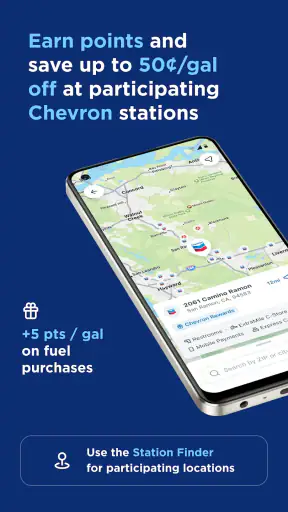
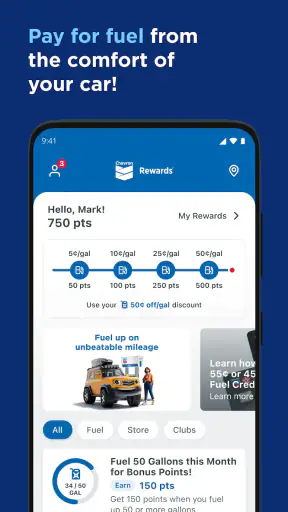
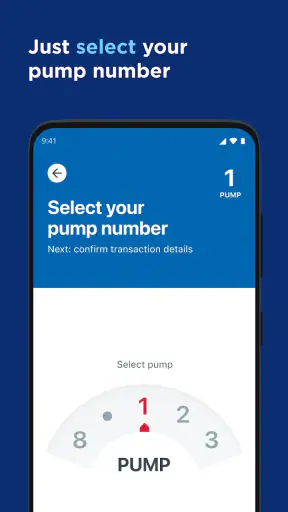
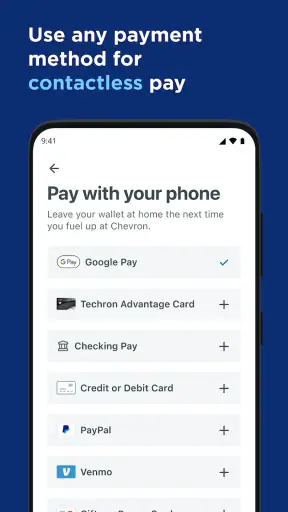
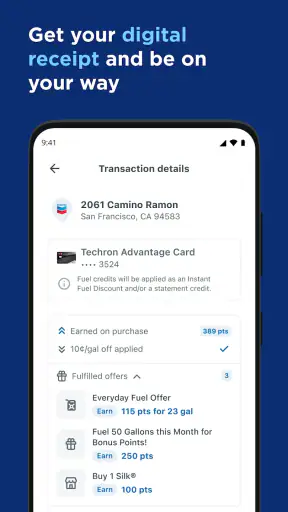
I tried the Chevron app with one simple goal: make a fuel stop less distracting and less time-consuming. Its main idea is straightforward—you can handle payment for fuel from inside your car instead of walking into the station or standing beside the pump. That sounds like a small convenience, but it can matter when the weather is unpleasant, you have children or pets with you, or you simply want to get back on the road quickly.
Chevron is a free fuel-payment and navigation app from Chevron U.S.A. Inc. It belongs to the Maps & Navigation category, although I would describe it more accurately as a station-focused payment companion than as a replacement for a full navigation service. It is aimed at drivers who regularly use Chevron locations and want a smoother way to pay at the pump.
The app has been available since April 17, 2019, and its Everyone age rating makes it accessible to a broad audience. With an average rating of 4.8 from around 120 thousand ratings and more than 1 million installs, it clearly has strong appeal among people who find its particular fuel-stop workflow useful. My experience is that its value depends less on how often you use navigation and more on whether the stations you visit fit the Chevron ecosystem.
How the Chevron app fits into a normal fuel stop
The most useful way to think about this app is not “another map.” It is a way to move part of the fuel-purchase process into the car. Instead of getting out, choosing payment at the pump, and dealing with the physical terminal, you use the app to pay for fuel from where you are sitting. That is the central benefit, and the rest of the experience should be judged around it.
For a driver who already knows where to stop, this can feel more focused than opening a general mapping app. Google Maps, Apple Maps, and similar tools are better for broad route planning, traffic information, and discovering many kinds of nearby businesses. Chevron serves a narrower purpose: helping you interact with a Chevron fuel stop when you are ready to refuel.
I also like the distinction between finding a station and paying at one. A map can tell you where fuel is available, but it does not necessarily make the transaction itself easier. Chevron’s strongest use case begins when you pull into a participating location and want to avoid unnecessary contact with the pump or the station counter.
That focus also creates the app’s biggest limitation. If your driving routine takes you across regions with few Chevron stations, the app will not become a universal fuel tool just because it sits in your phone. Its usefulness follows the brand’s physical coverage and your own habits. Before relying on it for a long trip, I would check where your intended stops are rather than assuming every convenient station will support the same experience.
What “free” means in practical terms
The app itself is free to download and use. That is important because the value calculation is uncomplicated: you are not paying an app subscription simply to access its fuel-payment workflow. The money you spend is the fuel purchase itself, not an advertised fee for the application.
Free access does not mean every fuel stop costs the same, and it does not turn the app into a discount program by itself. I would not install it expecting the application alone to reduce the price displayed at the station. Its financial value is mainly indirect: it can save time, reduce friction, and make a familiar Chevron stop more convenient.
That distinction matters for anyone comparing it with a general payment method. If you are already happy paying at the pump with a physical card or another phone wallet, the app may not save you money. Its advantage is the workflow, especially the ability to stay in the vehicle, rather than a guaranteed lower fuel price.
I also prefer to keep expectations realistic around payment setup. A fuel-payment app normally needs you to prepare an account and payment method before the first urgent refueling situation. I would set it up while parked at home, not while blocking a pump with a nearly empty tank. A few minutes of preparation can determine whether the app feels effortless or like an unnecessary obstacle.
The everyday scenario where it makes the most sense
Imagine arriving at a Chevron station during a heavy rainstorm with a sleeping child in the back seat. Walking away from the car may wake the child, leave the cabin unsecured, or simply make an already tiring stop more difficult. Paying from the car changes the practical experience: you can keep your attention on your passengers and finish the fuel stop with less movement.
The same logic applies to drivers with mobility limitations, anyone traveling with a dog, and people who are uncomfortable leaving valuables or passengers unattended. These are not flashy features, but they are meaningful reasons to prefer a station-payment app over the standard pump routine.
There is another useful scenario on a rushed commute. If you are already stopped at a familiar Chevron location, opening a dedicated app can be faster mentally than juggling a wallet, card, and receipt while watching the clock. The benefit is small on one visit, but repeated convenience can make the app worthwhile for regular customers.
My practical tip is to open the app before you pull into the station whenever possible. That gives you time to confirm you are at the intended location and reduces the temptation to handle the phone while maneuvering between pumps. Once parked, the app should support the transaction rather than become another distraction.
Where it differs from ordinary navigation apps
General navigation apps are still the better choice when your main question is “Which route should I take?” or “Where can I find the cheapest fuel across several brands?” They offer a broader view of the road and usually fit better into a journey that includes restaurants, hotels, charging points, or multiple stops.
Chevron is more specialized. Its appeal comes from combining a brand-specific station visit with payment convenience. If you often stop at Chevron, that specialization can be a strength because the app is not trying to do everything. If you rarely use the brand, the narrow focus becomes wasted space on your phone.
I would use a navigation app to plan the trip and Chevron to handle the fuel purchase when the stop is suitable. That combination is more sensible than forcing either app to do the other’s job. Navigation helps you decide where to go; Chevron is most useful once you have arrived at the right kind of station.
Small workflow choices that improve the experience
One non-obvious trade-off is that convenience depends on preparation. The app is most valuable when your account and payment details are already ready. Installing it at the pump may be possible in a technical sense, but it defeats the point of a quick, low-friction stop. I recommend signing in, reviewing the payment setup, and becoming familiar with the station-selection flow before your first real use.
A second tip is to treat location confirmation as part of payment safety. At a busy station, it is easy to select the wrong nearby location if several are close together. I would pause long enough to verify the station before authorizing fuel. That extra moment is preferable to discovering that the app and your physical position do not match.
A third insight is that the app is better for repeat routines than for spontaneous brand switching. If your weekly commute passes a Chevron station, you can build a dependable habit around it. If your travel pattern changes constantly, a brand-neutral payment or navigation option may be more flexible. The right choice is determined by consistency, not by the app’s rating alone.
I would also keep a backup payment method available. Phones can run low on battery, connectivity can be inconvenient, and an app-based transaction may not be the right tool in every situation. Carrying a card is not a criticism of Chevron; it is sensible planning for any mobile payment workflow. The best convenience tool is one that does not leave you helpless when conditions are less than ideal.
Who will get real value from it
The app is a strong fit for regular Chevron customers who want to pay without leaving the vehicle. It is especially appealing if you frequently refuel with passengers, deal with poor weather, have mobility concerns, or simply dislike handling payment outdoors. For those drivers, the convenience can justify giving a dedicated app a permanent place on the phone.
It can also suit people who prefer keeping fuel transactions separate from a general wallet application. A focused app may feel easier to understand because its purpose is limited to the Chevron stop. That simplicity is useful when you do not want a large financial or navigation application competing for attention.
On the other hand, I would skip it if you almost never visit Chevron stations. I would also hesitate if your priority is comparing fuel prices across many brands, planning complicated road trips, or finding the broadest possible station coverage. In those cases, a general navigation app or a brand-neutral fuel tool is likely to deliver more value from a single installation.
Drivers who are already satisfied with paying by card at the pump may not notice a major improvement. The app does not need to be bad for that to be true; it simply offers a different kind of benefit. If your current method is quick, comfortable, and reliable, the switch is optional rather than necessary.
What the ratings suggest—and what they do not
The app’s 4.8 average and more than 1 million installs show that many drivers find the concept worthwhile. I see that as encouraging, particularly because payment convenience is easy to judge in everyday use: either it makes the stop smoother or it does not.
Still, a high rating should not be treated as proof that it will fit every driving routine. Ratings combine experiences from people with different station access, phones, payment habits, and expectations. Someone who stops at Chevron several times a week may love the app, while a driver who travels mostly through areas without Chevron locations may have little reason to keep it installed.
The right question is therefore personal: do you regularly use the stations this app is designed around, and would paying from the car improve your routine? If the answer is yes, the strong user response supports trying it. If the answer is no, the rating alone is not a reason to download another specialized tool.
My final recommendation
My verdict is positive, but deliberately narrow. Chevron delivers clear value as a free, brand-specific way to make fuel payment more convenient, especially when staying in the car matters. It is not a complete navigation replacement, not a universal fuel-price comparison service, and not automatically a money-saving tool.
I would recommend it to regular Chevron customers, families making frequent stops, and anyone who values a simpler pump experience over a broad collection of travel features. I would skip it if your stations vary widely by brand or if your existing card and navigation setup already solves the problem comfortably.
The best way to judge it is to install it before your next planned Chevron visit, prepare the account while parked somewhere safe, and use it during an ordinary refueling stop. If the ability to pay from the car removes a real inconvenience, the free app has earned its place. If it merely duplicates a payment method you already prefer, there is no strong reason to force the change. Its real value is convenience at the right station, not a promise of savings everywhere.


